Pages

Showing posts with label technology. Show all posts

Sunday, December 22, 2013

Ten Lessons LEARNED from the LIVING MOBILE School of Hard Knocks


Every new stage in life involves some new learning.   No matter how much anyone tries to prepare you for a new stage of life or how much you read about your new destination; there are some lessons that are only learned through the school of hard knocks. And since this blog is about LIVING LEARNING mobile, why not share some recent “learning”.


I'm not usually a high maintenance girl,  but one thing I've accumulated over the years is a very fun and versatile collection of glassware. I knew that 9 champagne flutes, 4 martini glasses, a dozen wine glasses,  a half a dozen cordial glasses, juice glasses, beer glasses, tall water glasses,  and  the ever so practical size milk glass weren't going to accompany us on this trip, but I could not bring myself to give or sell my collection.  So these made the cut of things that would survive storage in somebody's attic.  


But that doesn't mean I succumb to drinking wine in the multipurpose LL Bean blue plastic cups which Craig has assured me can be a coffee cup, soup container, measuring cup and any other container one might hope for on the road.   I rearranged the dishes and was pretty tickled when I found room for 4 wine glasses and 2 martini glasses.  Craig just shrugged, smiled, and accommodated me.


School of hard knock lesson #1 - Stemware was not made for small RV size kitchen.


Okay…I get it, now.    So when we got down to a single wine glass,  I  had another bright  idea and measured the opening of the wooden glass holder, and found stemless wine classes that were narrow enough to fit these.


School of hard knock lesson #2 -  Stemless wine glasses are  no better at surviving the RV kitchen.   


Down to one solitary wine  glass,  I noticed a set of red trimmed goblets in a thrift  shop in Cedar Key that looked like they might survive our lifestyle. Who would have thought that plastic wine glasses would have made their way home with Lucie.  Ah well.


School of hard knock lesson #3 -  Be careful when opening the overhead bin - contents may have shifted during transit


We  have all heard it many times, but what does it take for us to actually prepare for "shifted content".   Well for me it was when my Chromebook (that was neatly tucked away in my overhead office bin)  came flying out and landed squarely on my once unblemished Macbook air (sitting on the living area table - a.k.a. Lucie and Craig's shared office desk). Who would have thought that  this wimpy little plastic Samsung Chromebook could put a huge dent into my shiny well built Macbook  Air.  Sigh!  I guess having a dent in ones Macbook is something I can live with.


School of hard knock lesson #4 - Strewn wires in small spaces are a trip hazard


Much like an old house, our old bus could use a few more outlets around the couch area. Unfortunately, that’s where I like to sit and my old Windows laptop usually needs to be plugged in making its power cord the perfect trip hazard. In a recent entanglement, my old Lenova offered just enough resistance to bend the connector so the power cord no longer fits snuggly enough to keep the laptop charged.  With just the right amount of tweaking I can get enough of a charge to do the few things I still need my Windows machine for.


School of hard knocks lesson #5 - My Macbook Air does not like coffee - not even a little sip   


Despite the fact that my coffee was in a covered travel mug nestled in one of the two cup holders on the bus ,  enough java managed to to jump out to splatter on my Macbook.


School of hard knocks lesson #6  don't assume that the shiny new red protective cover you just added to your Mac book protects it from all types of damage. Especially when that protective skin traps a dash of liquid inside so you don't know that you have actually marinated your computer for days, until the screen starts to flicker and dark and dim sections of the screen move around from left corner to right corner.


School of hard knocks lesson #7 Don't assume that Apple Care covers all possible damages to your computer

I assumed that the Apple Care I have been buying with all my Apple products was there to help people like me that are hard on their technology.  Last week I learned that all it takes is a little bit of moisture to trigger a liquid sensor that disqualifies your  $700 computer repair  from  being covered by Apple Care.    When we drove to Gainesville to retrieve my “unrepaired” Macbook Air from the Apple 'hospital", I did get to handle a new Macbook Pro Retina and was impressed by the lack of difference between its weight and that of my Air.  (something to ponder) Thankfully I can continue using the Air with an external monitor for now.


School of hard knocks lesson #8 Moving your “work space” from inside to outside sometimes requires a 3rd hand


It’s been great to bounce back and forth between inside and outside workspaces, but all that moving around requires extra precaution.   Hours after unpacking and setting up a brand new iPad mini, Craig gathered his ‘mobile’ tools to move inside when his new iPad mini slid out of his hands and landed on the cement pad outside our bus.  The screen now has a 3 inch crack.   ;-(  Thankfully Craig’s experience handling the technology needs of schools has included repairing  many iPad screens.  Parts are on order.  We’re thinking that the iPad might have had a better chance of survival if it had landed on the the outdoor patio carpet instead of a concrete slab. Note to self:  Always roll out the carpet for yourself!


School of hard knocks lesson #9   Always double check and triple check the pressure of all tires before moving to a new location


We have no idea what caused the right tire of our tow dolly to shred (8 miles before our arrival at Cedar Key)  but we took it as a reminder that we needed to be more diligent about checking the air pressure on all tires (not just the bus, but also the dolly).   Thankfully  this lesson happened on Route 24 instead of on Interstate 95.  A friendly local musician stopped and offered us both help and advice about where we might find a replacement and another local resident agreed to let us store the dolly in his driveway for a few days while we secured a new tire.  We’ve decided to take heed of this warning to double check our tire health frequently.


School of hard knocks lesson #10  Don’t ignore your body when it says “step away from the technology”


Probably the most important lesson learned so far in this trip has been to pay attention to how your body is reacting to change!  Although I was still able to use my Macbook Air when tethered to an external monitor,  it no longer served me when I wanted to move outside.  Craig lent me a new Windows 8 Lenova that he uses to support the students and teachers back in Vermont .  As soon as I started to use this slick new laptop, I found myself cursing the trackpad .  I decided that it was just a matter of my learning the new Windows 8 gestures, and that this would be a “good”  thing for me to practice and would help me better support educators who use this platform.  The more I used it the more I felt  my neck strain as my right hand tried to use a trackpad that was trying to emulate the “touchscreen” functionality built into Windows 8.  (BAD IDEA!)  Craig has deployed 100 of these Windows 8 Lenova laptops  and almost 90% of them have been downgraded to Windows 7 OS by request of the user. 

Between the trackpad and my already questionable posture,  I kept feeling the strain in my neck increase, but I kept working in 5th gear for  long hours at a stretch to support students' final projects, get grades in for my 3 online graduate courses, and also launch a few new projects before everyone left for holiday break.  Unfortunately, I am now going to be spending my holiday break looking for remedies to make my arm, neck, back strain go away and regain the range of motion I seem to have lost in my neck.


I bet that those of us living and learning mobile could add a few additional insights to this study of New Technologies, New Behaviors, and New Postures. I wonder if Steelcase might consider creating a “mobile” chair that could accommodate today’s new generation of mobile workers!


This lesson (listening to my body) has persuaded me to go ahead and order a New Macbook Pro Retina.  I wasn’t quite ready to upgrade yet, but eventually decided that adding a new member to our Apple family”  might be worth it IF


But one thing I am enjoying with my new purchase is that being untethered again is absolutely helping me take fuller advantage of living learning mobile!


Sunday, November 10, 2013

Traveling down the road with WiFi

Lucie has been doing a wonderful job keeping up with our daily travels.  I've decided I would add some "specialty" posts, the things I've discovered that might be of interest.  I also need to practice writing blogs again, so it feels good starting with a topic where I am comfortable.

For this first post I will describe the mobile WiFi setup we are using to stay connected to the Internet as we travel.

I designed this so we would be able to have WiFi as we drive down the road.  My inspiration is what is advertised (but seldom a reality) on Amtrak trains and the Mega Bus.

I ended up ordering from the 3G Store, not only because they had packages specifically for RVs, but because the online reviews spoke highly of their technical support.  After designing the system and coming up with what I thought I should purchase I called their tech support line and confirmed that I was getting what I needed.

This is what I got.


1 x 118" (9'10") USB Extension Cable (26686) (SKU: ) = Retail: $11.99
1 x Antenna Adapter Cable for UML295/PC5750/PX500/some Samsung and LG phones (359919) (SKU: ) = Retail: $13.00
1 x Wilson Sleek 4G-V Signal Booster for 3G and Verizon 4G LTE - 815126 [700V/800/1900mhz] (815126) (SKU: ) = Retail: $129.95
1 x $69.99/mo 20GB plan (billed by Millenicom) (**MLC-20GB-SVC) (SKU: ) = Retail: $0.00
1 x Micro SIM Card Adapter (MC-SIM-ADAPT) (SKU: ) = Retail: $7.99
1 x MiFi 4620LE Hotspot for Millenicom's $69.99/mo 20GB 3G/4G Plan (Includes Activation Fee) (MLC-4620LE) (SKU: ) = Retail: $149.99
2 x Taoglas 7.5" Omni WiFi Antenna (2.4Ghz/5.0Ghz) (TG-WIFI-LG) (SKU: ) = Retail: $33.98
1 x Verizon Pantech UML290 - Refurbished, Like New (K-VZW-UML290) (SKU: ) = Retail: $79.99
1 x FME/Male to SMA/Male Adapter - 971119 (971119) (SKU: ) = Retail: $5.95
1 x Cigarette Lighter Adapter for MBR1400/MBR1200B/MBR95/CBR450/CBR400/CBA750/CTR35/Surf + More (170452-000) (SKU: ) = Retail: $24.99
1 x Pepwave Surf SOHO 3G/4G Router w/ WiFi as WAN Firmware 6.0.3 (SUS-SOHO) (SKU: ) = Retail: $129.99
1 x Omni RV Antenna with Spring Base - 301133 (301133) (SKU: ) = Retail: $49.95
1 x Wilson 3-Way Omni Mount - 901104 (901104) (SKU: ) = Retail: $10.00
1 x 1 Year of Technical Support (Included) (**SUPPORT-1YR-INCLUDED) (SKU: ) = Retail: $0.00
------------------------------------------------------
Sub-Total: $647.77
$4.99 Standard Shipping (3-8 Day Delivery): $4.99
Total: $652.76
As we drive down the road we use the cell towers to keep our devices connected through our own internal wifi network.  Cellular Data plans are expensive and we needed to be able to afford to use this system so I ended up settling on Verizon, which we purchase through Millenicom for $70 for 20 Gigs a month.
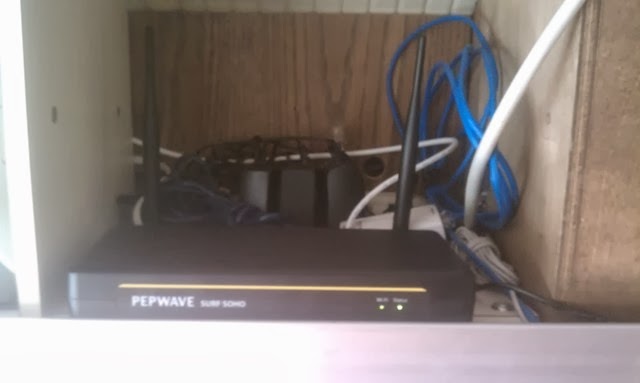
The device that this system is based upon is the Pepwave Surf SOHO.  This is very similar to a home WiFI router.  It has a WAN port that you could hook up to a DSL Modem or a Cable Modem, it then takes that Internet connection and shares it with all of your devices through a private WiFi network.  In addition to the WAN port (which is an Ethernet port) the Surf SOHO has a USB port that supports a large number of USB Cellular Modems.  This USB Cell Modem is how we stay connected to the Internet as we drive down the road.  There are at least 3 companies who make these combination Cellular/DSL/Cable routers.  I chose this one because it monitors how much bandwidth we have used through each of our connections to the Internet.  This way we know when we are approaching our 20 Gig monthly limit.  Also all of the equipment needs to be able to run from the RV's 12 volt electrical system, so I added a 12 volt adapter for the Surf SOHO.
Sorry for the poor quality of the photos, my poor old HTC phone just can't take a low light picture.  Maybe next time I'll get Lucie to take the pictures on her iPhone!

The MiFi 4620LE Hotspot that Millenicom supplies with their 20 Gig Plan has a reputation for being unreliable and having to be rebooted for it to remain attached to the cellular network.  I decided to replace it with a Verizon Pantech UML290 cellular modem.  I removed the SIM from the MiFi 4620LE Hotspot and placed it in the UML290 cellular modem.  Because the Sim slot in the UML290 cellular modem is a different size I needed an adapter.  The MiFi 4620LE Hotspot is battery operated, so if we wish we could put the SIM back in it and take it with us to the beach or some other remote spot and have access to the Internet (if you know Lucie you will understand why this is a consideration).

Our RV is made by the Bluebird Bus Company, which makes school buses, and is clad with riveted solid steel.  It blocks most cell signals.  Because of this we need an external antenna, which I have mounted to the roof of the RV.  Because this antenna is now the highest point on our mobile home I got a 21' Omni RV Antenna with Spring Base so if we hit a tree branch it won't break off.  The antenna receives both 3G and 4G signals, and is tuned to the frequencies Verizon uses.  
The antenna in its traveling position.  It is the black and silver device that is casting a shadow on the storage pod.
There are many locations where the cell signal isn't strong enough for a good data connection.  There are devices called Cell Boosters that amplify the signal from the antenna to the cell modem and amplify the signal from the cell modem to the antenna so it can reach a cell tower further away.  Right now the cell booster market is in transition.  Because of changes in FCC regulations many older cell boosters are no longer being made (they would blast over the cell tower's signals interfering with normal reception).  The Wilson Sleek 4G-V Signal Booster for 3G and Verizon 4G LTE is one of the few on the market now that follow the new FCC rules.  It is tuned specifically for Verizon's 4G frequencies.

This is what the booster and cell modem look like mounted in one of the overhead cabinets.  The cell modem is rubber banded to the booster.  The booster is plugged into the RV's 12 volt system and connected to the antenna on the roof.  The cell modem has a USB cable (white) which connects it to the Pepwave Surf SOHO in another compartment.

So that is the system that allows us to travel down the road with WiFi in the RV.  One other feature of this system, that is actually more useful when we are stopped at a campground is that it can automatically switch between several sources of Internet connectivity.  Many campgrounds offer WiFi for their campers.  The quality of this campground WiFi sometimes isn't up to the task.  For several years now I have used an EnGenius ENH202 R to make the most of campground WiFi.  This device is mounted on the roof and uses an Ethernet cable (using Power Over Ethernet (POE)) to bring an amplified WiFi connection to the WAN port of the Pepwave Surf SOHO.  The term people are using for this type of connection is WiFi as WAN.  The Pepwave can be set to use the campground WiFi until it looses the Internet and then automatically switch to the more expensive Verizon Cell modem connection.
A note on the current EnGenius ENH2020 R - the company seems to have switched to a directional antenna and it no longer can perform as a client router.  For this reason I don't believe I would choose the new version. 

This system has worked well driving down the road.  There are some spots where there just isn't a cell signal.  In those instances we just have to wait until we get out of the valley or over the ridge then our Internet comes back.  So far every campsite we have had has had a good enough cell signal for email reading, blog posting and web surfing.  Just don't click on the video until we get campground WiFi.